References

Make sure you already have requested access to our document database so you can upload your reference checks without delay. If you are unable, you may email a digital copy to kydoxierescue@aol.com
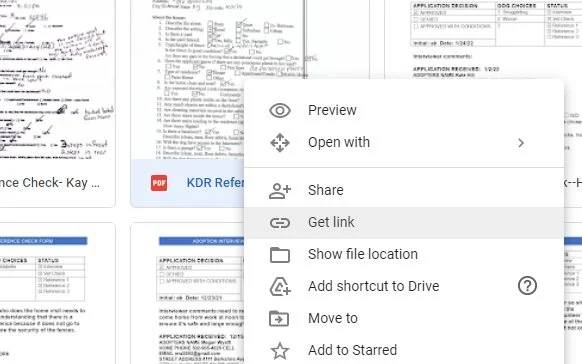
Right click on your reference in the database, and click “get link” - once copied to your clipboard, paste it in your assigned cell in the application.
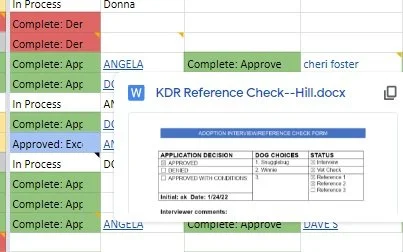
Paste your document link into your assigned reference field, using your name as the link title. For example - Angela has linked her reference, and becomes visible when you hover over her name. This way people can preview the document, or choose to click and view it in it’s complete form.
Reference Checking - a guide.
You will receive a copy of the applicant’s application from the office, or will be assigned to check references from the Director.
To assist in reference checking, please use the guide on the left. You may download and print, or fill out digitally. We have included a pdf, or docx format, choose whichever works for you!
-
To check references, you must be a formal (signed agreement) volunteer as you will be collecting and reviewing sensitive information. You will need access to our google database to upload documents and sign off on your progress. If this is not an option, you may make other arrangements with the director. Please let the office know if this is the case.
Request Access to upload your references here
-
You will need a computer to fill out and complete digitally, or print out your checklist to fill out manually during your call.
You can fill out in MS Word using the docx document linked here. Or, you can fill out using the pdf document.
-
When checking references, call them first and thank them for their interest in KDR. Review their application with them to make sure that all the information is correct.
Next, ask them when they believe is the best time for us to contact the references they’ve listed.
Tell the applicant to contact their references, including their veterinarian, and inform them that we will be calling. This ensures more timely completion of their application if we are able to reach their references.
Veterinarian offices will not typically give out privileged information unless they have been granted permission from the applicant to release it to us for consideration to adopt.
Go over the other relevant areas as needed with the applicant. Leave the remaining items for when you are checking with their references.
-
Use your checklist guide, and record your answers there or if easier write them down on paper in the moment and combine your notes on your checklist later.
-
When complete, you can print your document to PDF, or save the PDF as a new document.
Save your document with the Title: KDR Reference Check - FirstName LastName
When ready, upload your reference to the database (if you still don’t have access, be sure to request it!).
Once uploaded, copy the document link, and paste it to your reference assignment in the appropriate application tab. Make sure you double-check you have the correct assignment link to the correct application.